
Quick Answer:
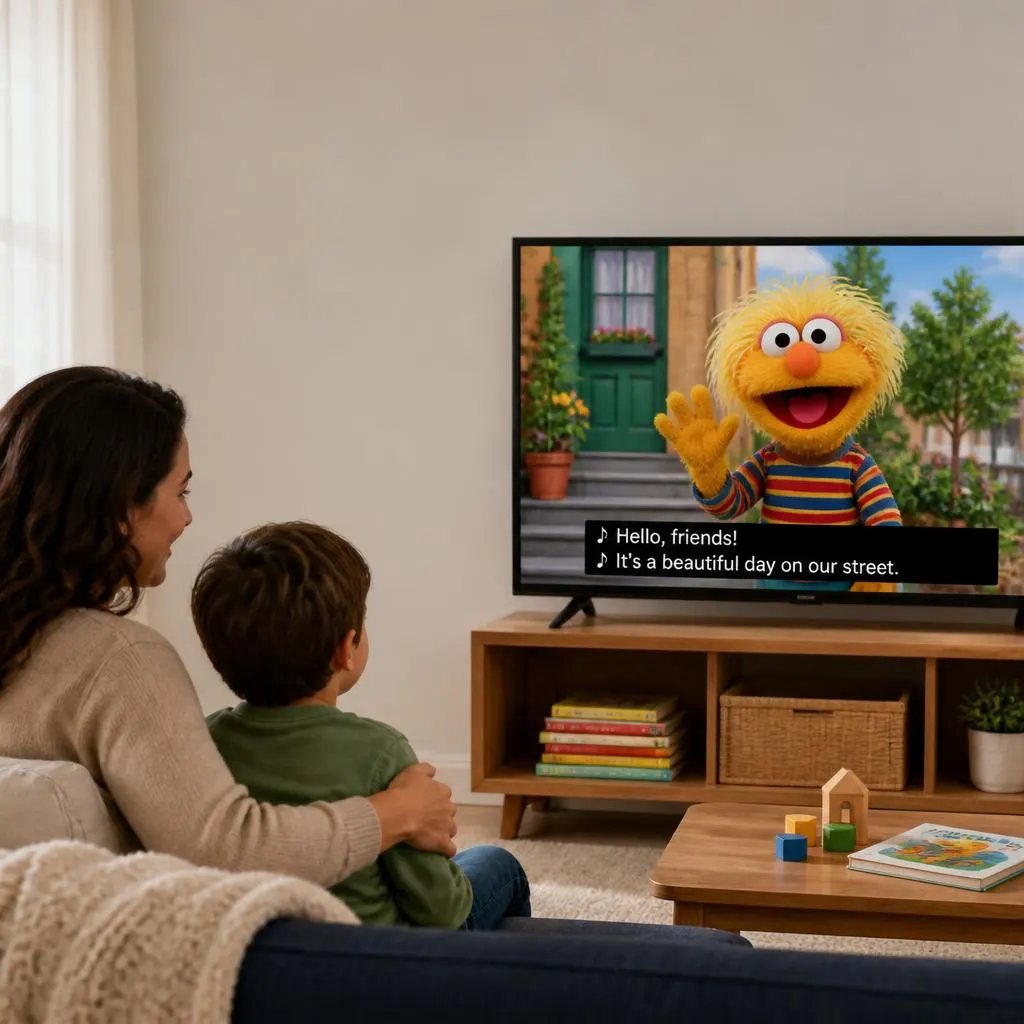
Sesame Street closed captions display spoken dialogue, songs, and important sounds as text on the screen. They help children follow conversations, build vocabulary, practice reading, and make episodes more accessible for viewers who are deaf or hard of hearing. To turn captions on, look for the CC button or caption settings in your streaming app or TV. Caption availability and language options may vary by episode and platform.
If you have watched Sesame Street with the captions turned on, you may have noticed that the words on the screen do more than repeat what the characters say. Closed captions can display dialogue, identify speakers, and describe important sounds that help viewers follow the story.
Sesame Street closed captions are useful for children learning to read, viewers who are deaf or hard of hearing, families watching television in noisy environments, and anyone who prefers reading along with a program. They can make familiar songs, conversations, jokes, and educational moments easier to follow.
Whether you want to understand what these captions mean, learn how they support early literacy, or turn them on while watching Sesame Street, this guide explains the essentials in simple terms.
What Are Sesame Street Closed Captions?
Sesame Street closed captions are on-screen text versions of spoken dialogue and relevant audio information from the television program. Depending on the episode and caption format, they may include character names, song lyrics, sound effects, and other details that help viewers understand what is happening.
For example, a caption might identify a character speaking or describe a sound that matters to the scene. These details help viewers follow the program without relying entirely on audio.
The term closed captions means viewers can generally switch the text on or off through their television, streaming service, or playback settings. This differs from open captions, which remain visible as part of the video itself.
Why Are Closed Captions Used on Sesame Street?
Sesame Street closed captions make the program more accessible by displaying spoken words and meaningful sounds as text. They can help deaf and hard of hearing viewers follow conversations, support children as they connect spoken language with written words, and make episodes easier to understand in noisy or quiet environments.
They are also useful for parents, teachers, and caregivers who want children to notice vocabulary, recognize words, and engage with educational content.
How Sesame Street Captions Support Children’s Learning
Sesame Street combines stories, songs, conversations, and playful activities to introduce children to early learning concepts. Captions can provide an additional way to engage with that content by letting children see words while they hear them.
1. Connecting spoken words with written text
When children hear a character say a word and see the same word on the screen, they get an opportunity to connect spoken language with print. This can help reinforce word recognition, especially when an adult pauses to discuss a word or repeat it together.
2. Building vocabulary through everyday conversations
Familiar characters often use language in playful, memorable situations. Captions give parents and children a way to revisit unfamiliar words, notice how sentences are formed, and talk about what a character means.
3. Encouraging early reading habits
Following captions can introduce children to the appearance and sequence of written words. However, captions alone do not teach reading. Shared reading, conversation, play, and age appropriate learning activities remain important parts of early literacy.
4. Making songs easier to follow
Songs and rhymes are an important part of children’s programming. When lyrics appear in captions, children may find it easier to follow along, recognize repeated words, and connect sounds with written language.
5. Supporting children with different learning needs
Captions can be especially valuable for deaf and hard of hearing children. They may also help some children who benefit from seeing language as well as hearing it. Every child’s needs are different, so captions work best as one option within a broader learning environment.
Sesame Street Closed Captions and Accessibility
Accessibility helps more people enjoy the same educational content, even when they experience audio or visual information differently.
Sesame Workshop has worked with accessibility partners to expand access to Sesame Street content. For example, a 2023 announcement described a collaboration with Dicapta to provide captions and descriptive audio for selected Spanish language Sesame Street content. The initiative also included other accessibility formats for selected programs. Sesame Workshop
Here is how captions can help different viewers.
- Deaf and hard of hearing viewers: Captions provide access to dialogue and relevant audio information that might otherwise be missed.
- Young readers: Seeing words while hearing them can reinforce connections between spoken and written language.
- Parents and caregivers: Captions make it easier to follow dialogue and discuss a scene with a child.
- Multilingual households: Captions in a familiar language may help viewers follow the conversation, when that language is available.
- Viewers in noisy environments: On-screen text can help when background noise makes dialogue difficult to hear.
- People watching quietly: Captions allow viewers to follow a program without turning up the volume.
Closed captions do not replace every accessibility feature. For viewers who need narration of visual action, audio description is a separate feature. Caption and audio-description availability can vary by episode, platform, and language.
How to Turn on Sesame Street Closed Captions
The steps depend on where you watch Sesame Street. Look for the CC icon or a menu labeled Captions, Subtitles, or Audio and Subtitles. The available options may differ between episodes and devices.
On the PBS website
If you are watching a Sesame Street video on PBS.org, follow these steps:
- Open the video and start playback.
- Find the CC button in the lower right corner of the video player.
- Select CC to open the caption options.
- Choose English or another available language.
- If needed, use the nearby caption formatting control to adjust the appearance of the text.
These steps follow the instructions published by PBS Help. PBS Help
On the PBS app
The exact steps depend on the device you use.
- Open the PBS app and start the episode.
- Pause the video or reveal the playback controls.
- Look for the closed caption icon.
- Select the available caption language.
- Resume playback and check that the words appear.
For example, PBS documents a specific method for Apple TV: pause the video, navigate to the closed caption icon, and select English to enable captions. PBS Help
On a Roku device
For the PBS app on Roku, start playing the video and wait until any sponsorship message finishes. Press the star button on the remote, open the Captions mode option, and select On Always. Choose Off in the same menu when you want to disable captions. PBS Help
On a smart TV
Some smart TVs manage captions through their own accessibility settings, while others use the streaming app’s playback menu.
For supported Samsung TVs, PBS provides these instructions:
- Open Settings from the TV’s Home screen.
- Select General.
- Open Accessibility.
- Select Caption Settings.
- Turn Caption on.
Other television brands may use different menu names. PBS Main Product Support
Important: If you cannot find a caption option, the episode or clip may not offer captions on that platform. PBS notes that closed caption availability can vary by type of video. PBS Help
What to Do When Sesame Street Captions Are Not Working
If captions do not appear, you usually do not need to change anything complicated. Check the playback controls first, then try a few basic troubleshooting steps.
The CC button is missing
Some players hide their controls until you move the mouse, tap the screen, or press a button on your remote. Reveal the controls and look for the caption menu again.
If the option is still missing, try another Sesame Street episode. Not every online clip necessarily offers the same accessibility options. PBS Help
Captions are turned on but do not appear
Try the following:
- Open the caption menu and confirm that a language is selected.
- Pause the video and resume playback.
- Close and reopen the video player.
- Check whether captions work on another episode.
- Update the app if it is out of date.
- Restart the streaming device if the problem continues.
These steps can help identify whether the issue comes from the player, the device, or the particular video.
The captions are difficult to read
If the player offers caption formatting, try increasing the font size or choosing a clearer text style. You can also check your device’s accessibility settings for caption appearance options.
For children who are learning to read, use a size that makes the text comfortable to follow without covering too much of the picture.
The captions are in the wrong language
Open the caption menu and select your preferred language if it is listed. Remember that audio language and caption language are separate settings in many players. An episode may offer English audio with English captions, but other combinations depend on the available tracks.
Closed Captions vs. Subtitles on Sesame Street
The terms closed captions and subtitles are sometimes used interchangeably, but they can serve slightly different purposes.
Closed captions
Display dialogue and may include relevant non-dialogue information, such as meaningful sound effects or music cues. They are especially useful for viewers who cannot fully access the audio.
Subtitles
Usually display spoken dialogue, often to help viewers understand a language they do not speak. Some subtitle tracks may also include additional audio information.
Open captions
Remain visible as part of the video image and generally cannot be switched off through the player’s caption controls.
The distinction is not always absolute because different platforms label their text tracks differently. When choosing a track for accessibility, look for one marked CC when available.
Tips for Parents Using Sesame Street Captions at Home
Captions can become a simple part of a child’s viewing routine. The goal is not to make every episode into a formal lesson, but to create opportunities for curiosity and conversation.
- Watch together when possible. Ask your child what a character said or what they think might happen next.
- Notice one new word. Choose a word from the episode and discuss what it means.
- Connect words with pictures. Point out an object on screen when you see its name in the captions.
- Sing along with captioned songs. Encourage your child to notice repeated words and rhymes.
- Follow your child’s pace. Some children enjoy reading the captions, while others may prefer to focus on the characters.
- Keep viewing balanced. Combine television with books, imaginative play, conversation, and hands-on activities.
- Make accessibility a normal choice. If your child benefits from captions, there is no need to treat them as unusual or distracting.
For deaf and hard of hearing children, captions can be an important part of accessible viewing. Parents can also explore other accessibility options when a particular program or device supports them.
FAQs
Does Sesame Street have closed captions?
Many Sesame Street episodes and videos offer closed captions, but availability depends on the particular episode and viewing platform. Check the CC or caption menu to see which options are provided.
How do I turn on Sesame Street captions?
Start the video, reveal the playback controls, and select the CC icon or caption menu. Choose an available language, such as English. On PBS.org, the CC button appears in the lower right corner of the video player. PBS Help
Can closed captions help children learn to read?
Captions can support early literacy by helping children connect spoken words with written text. They can reinforce vocabulary and word recognition, especially when combined with shared reading, conversation, and other learning activities. They do not replace direct reading instruction.
Are Sesame Street captions useful for deaf and hard of hearing children?
Yes. Captions provide text versions of dialogue and relevant audio information, making it easier to follow conversations and understand important sounds. The exact level of detail depends on the available caption track.
Why are captions missing from some Sesame Street videos?
Caption availability can differ between full episodes, short clips, and other video formats. The platform may not provide captions for every item, so check the video’s available settings or try another episode. PBS Help
Can I change the size of Sesame Street captions?
Some video players provide caption formatting controls, allowing you to change text size or appearance. PBS.org, for example, offers a control for formatting captions beside the CC option. PBS Help
Are closed captions the same as audio description?
No. Closed captions show spoken words and relevant audio information as text. Audio description provides spoken narration of important visual details for people who may not be able to see them clearly.
Can I watch Sesame Street with captions in another language?
Some Sesame Street content offers additional language options, but availability varies by episode and platform. Check the caption menu for the languages provided. Sesame Workshop has also announced accessibility initiatives involving captions for selected Spanish language content. Sesame Workshop
Should I leave captions on while my child watches?
You can leave captions on if they help your child follow the program or support their accessibility needs. Observe how your child responds and choose the viewing setup that works best for them.
Conclusion
Sesame Street closed captions help viewers follow dialogue, notice important sounds, and engage with the show’s educational content in a more accessible way. They can also give young children extra opportunities to connect spoken language with written words.
To get started, open your preferred Sesame Street episode, look for the CC icon, and select an available caption track. If captions are missing, check the player’s settings or try another video.
A small accessibility setting can make a meaningful difference in how children and families enjoy a familiar favorite.