Quick Answer:
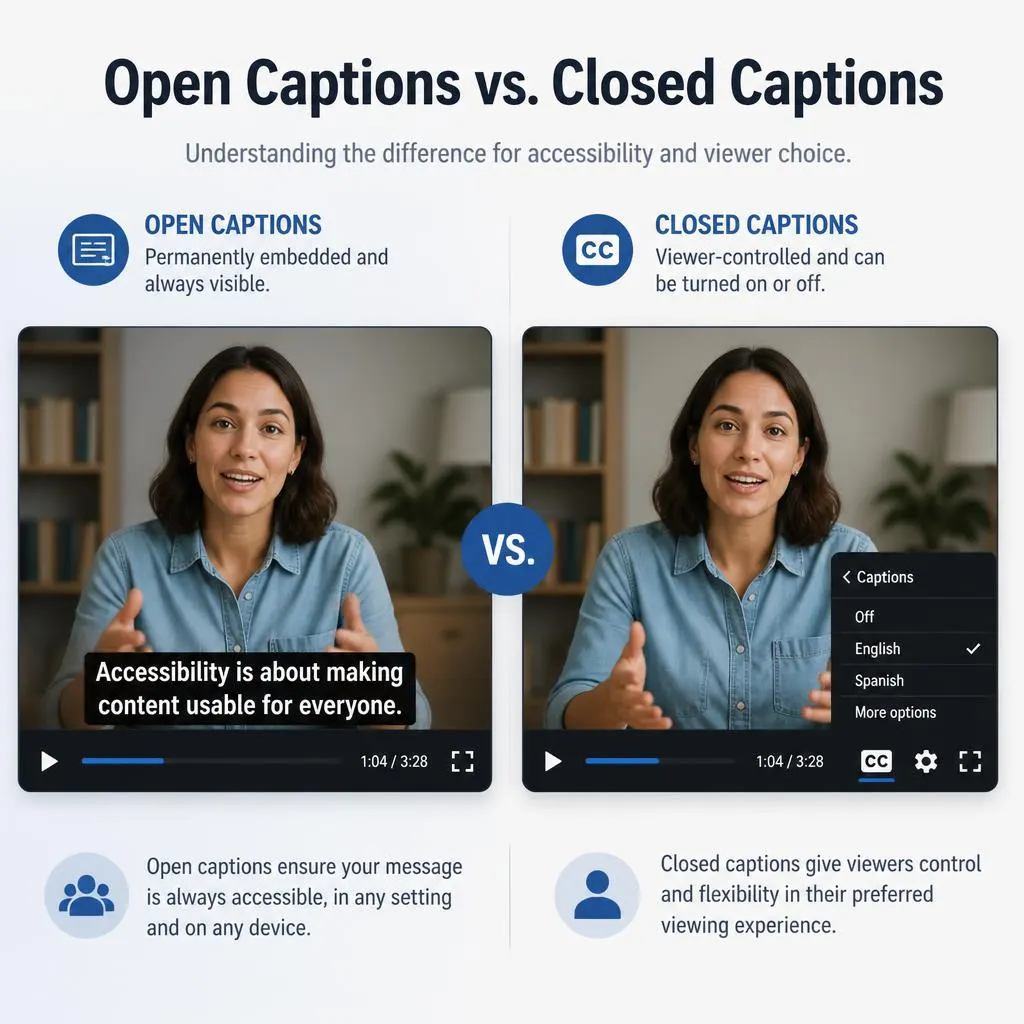
Open captions vs closed captions differ in how viewers access them. Open captions are permanently embedded in the video and cannot be turned off, while closed captions can usually be switched on or off through the video player. Both can improve accessibility by displaying spoken dialogue and meaningful sound information. Open captions work well for social media videos, while closed captions are useful for YouTube videos, online courses, and streaming content.
Open captions vs closed captions is a common question for people who watch videos, create social media content, publish online courses, or want to make digital media more accessible. Both types display spoken words and relevant audio information on the screen, but they differ in one important way: open captions are permanently visible in the video, while closed captions can usually be turned on or off by the viewer.
Understanding this difference helps you choose the right caption format for YouTube videos, Instagram Reels, TikTok clips, streaming platforms, educational content, and professional presentations. The best choice depends on your audience, publishing platform, viewing environment, and accessibility requirements.
This guide explains how each caption type works, compares their benefits and limitations, provides practical examples, and helps you decide which format fits your content.
What Is the Difference Between Open Captions and Closed Captions?
Open captions and closed captions both communicate spoken dialogue through on screen text. They can also identify speakers and describe meaningful sounds, such as a phone ringing or music playing, when those details matter to understanding the content.
The key difference is how viewers access them.
- Open captions: The text is permanently embedded in the video image. Viewers cannot switch it off using a caption setting.
- Closed captions: The text is provided as a separate caption track or supported caption data. Viewers can generally turn it on or off through the video player’s controls.
For example, a video with open captions displays dialogue directly on the screen every time someone watches it. A video with closed captions lets viewers choose whether they want the dialogue displayed.
Neither format is automatically more accurate or more accessible. Caption quality, readability, synchronization, language support, and accurate descriptions of meaningful sounds all matter.
Open Captions vs Closed Captions: Quick Comparison
Use this comparison to understand which caption format works best for your video, website, social media post, or accessibility project.
| Feature | Open Captions | Closed Captions |
|---|---|---|
| Visibility | Always visible | Usually optional |
| Viewer control | Cannot be switched off | Can usually be switched on or off |
| How they are added | Embedded into the video image | Added as a separate caption track or supported data |
| Customization | Depends on the creator’s video design | Depends on the platform and player |
| Works without caption controls | Yes, because text is part of the image | Not necessarily |
| Reusable across platforms | May need a new video export for changes | Caption files or tracks can often be reused |
| Accessibility | Can provide access when accurately designed | Can provide access when accurate and supported |
| Best suited for | Short clips, social posts, and fixed visual presentations | Streaming videos, online courses, and accessible media libraries |
Both formats can support accessibility when they accurately represent the audio and remain easy to read. The main distinction is viewer control, not whether one format is inherently better.
What Are Open Captions?
Open captions are text displayed directly on the video image. They remain visible throughout playback because the creator has embedded them into the visual content.
For instance, imagine a cooking creator explaining how to prepare pasta. If the words appear permanently at the bottom of the video, those are open captions. Viewers see the text whether they watch with sound on or off.
How Open Captions Work
Creators commonly add open captions through video editing software. The editor places each line of text at the correct point in the video and exports the captions as part of the finished image.
After exporting, the words appear in the video itself. A separate caption switch cannot remove them.
Open captions can include:
- Spoken dialogue and narration.
- Speaker names when identifying the speaker matters.
- Important sound effects.
- Relevant music descriptions.
- Dialogue translated into another language, when appropriate.
These details help viewers understand the message even when they cannot hear the audio.
Advantages of Open Captions
Open captions offer several practical benefits, especially when a video is shared across platforms with different playback controls.
- Always visible: Viewers do not need to find or activate a caption setting.
- Useful for silent viewing: People can follow the message when their device volume is muted.
- Consistent appearance: Creators can choose the font, color, size, placement, and background.
- Predictable presentation: The captions look the same wherever the exported video is displayed, although platform cropping can still affect them.
- Convenient for short videos: Creators can prepare a single version for social feeds where viewers may scroll quickly.
Open captions also make it easier to match text to a brand’s visual identity. A creator can use consistent typography and positioning across a series of videos.
Disadvantages of Open Captions
Open captions have limitations that matter when you plan to reuse or update content.
- Viewers cannot turn them off if they find the text distracting.
- Incorrect captions require editing and exporting the video again.
- Text can cover faces, product details, demonstrations, or other important visual information.
- Captions may become difficult to read against busy backgrounds.
- The text may be cropped when a platform changes the video’s aspect ratio or displays interface elements over it.
Creators should test captions on a phone as well as a larger screen. Text that looks clear in an editing window might be difficult to read in a small social media feed.
When Should You Use Open Captions?
Open captions are a strong choice when you want the words to remain visible without relying on a player’s caption settings.
Consider them for:
- Instagram Reels and TikTok videos.
- Short promotional videos.
- Social media tutorials.
- Product demonstrations.
- Video advertisements.
- Short clips shared through messaging apps.
- Presentations displayed through simple video playback systems.
For longer educational videos, films, and content libraries, a separate caption track may provide greater flexibility. You can also publish a video with open captions and provide a transcript when appropriate.
What Are Closed Captions?
Closed captions are synchronized text that viewers can generally enable or disable through a supported video player. Unlike open captions, they are not permanently part of the video image.
For example, a viewer watching a lecture on YouTube can select the captions option to display the speaker’s words. Another viewer can turn captions off and watch the same video without them.
How Closed Captions Work
Closed captions are commonly delivered through a caption track or a supported caption file. The file contains the text and timing information needed to display each line at the right moment.
Some formats also support speaker identification, placement, and styling information. The player’s capabilities determine which features viewers can access.
Creators may prepare captions manually, use automatic speech recognition, or upload an existing transcript and synchronize it with the recording. YouTube Studio, for example, provides ways to add, edit, and upload subtitles and captions.
Advantages of Closed Captions
Closed captions are particularly useful when accessibility and viewer choice are important.
- Viewer control: People can turn captions on or off as needed.
- Flexible presentation: Supported players may offer caption appearance or language settings.
- Easier corrections: Creators can often update the caption track without exporting the entire video again.
- Multiple language options: Platforms may support separate caption tracks for different languages.
- Suitable for long videos: Caption tracks work well for films, lectures, interviews, and recorded webinars.
- Useful for accessibility workflows: Properly supported caption tracks can provide synchronized text that assistive technologies may be able to access.
The exact features depend on the platform, player, and caption format. Not every player supports the same customization options.
Disadvantages of Closed Captions
Closed captions also have a few practical limitations.
- Viewers may not notice the caption control.
- Some people may not know how to enable captions.
- Caption files can be missing, incorrectly synchronized, or inaccurate.
- A player may not support a particular caption format.
- Some viewers may have difficulty changing the settings on their device.
A video does not become accessible simply because a caption track exists. The track must be available, accurate, synchronized, and usable with the intended playback system.
When Should You Use Closed Captions?
Closed captions are often the better starting point for content that needs long-term accessibility, multiple viewing options, or distribution through a supported media player.
They are especially useful for:
- YouTube videos with spoken content.
- Online courses and training modules.
- Recorded webinars.
- Interviews and podcasts that include video.
- Streaming films and television programs.
- Educational video libraries.
- Corporate training and public information videos.
- Live broadcasts when the platform supports live captioning.
If your audience includes people who are deaf or hard of hearing, make sure the captions communicate meaningful audio information rather than displaying dialogue alone.
Open Captions vs Closed Captions for Accessibility
Accessibility is one of the main reasons to understand the difference between these formats. Captions help people access information that would otherwise be communicated through sound.
The World Wide Web Consortium’s Web Content Accessibility Guidelines address captions for prerecorded and live synchronized media. For applicable prerecorded videos, WCAG Success Criterion 1.2.2 requires captions, while Success Criterion 1.2.4 addresses captions for live audio content. The specific requirements depend on the conformance level and the type of media.
Which Format Is More Accessible?
Neither format wins in every situation.
Open captions make the text immediately visible. That can help people who cannot hear the audio, viewers watching in noisy environments, and people who prefer to read while watching.
Closed captions give viewers more control and can support flexible language and display settings. However, viewers must be able to find and activate them when necessary.
The most accessible option depends on how the video is delivered and whether the captions accurately convey the audio.
What Makes Captions Accessible?
Regardless of format, aim for these essentials:
- Include all meaningful spoken dialogue.
- Identify speakers when the source of the speech is not clear.
- Describe important sounds that affect the meaning of the scene.
- Synchronize the text with the audio.
- Use readable text with sufficient contrast.
- Avoid covering important visual details.
- Check spelling, punctuation, names, and technical terms.
- Review automatic captions before publishing.
For example, if a video shows a person asking a question while a loud alarm sounds, captions that include only the question may omit information necessary to understand the scene. A sound description can provide the missing context.
The goal is not merely to put words on a screen. It is to communicate the important information carried by the audio.
Open Captions vs Closed Captions vs Subtitles
Captions and subtitles can look similar on the screen, but they do not always serve the same purpose.
Subtitles traditionally focus on spoken dialogue, often translating it into another language or presenting the words for viewers who cannot understand the original speech. Captions are intended to convey dialogue and other meaningful audio information, including sound effects, music, and speaker identification when needed. Terminology varies between countries and platforms, so the labels are not always used consistently.
| Type | Main purpose | Can viewers turn it off? |
|---|---|---|
| Open captions | Display dialogue and relevant audio information permanently | No |
| Closed captions | Display dialogue and relevant audio information through a caption track | Usually yes |
| Subtitles | Display spoken dialogue, often for translation or language support | Usually yes when provided as a selectable track |
For example, an English movie with French dialogue translated into English may use English subtitles. An English interview with captions identifying the speakers and a ringing phone uses captions to convey more of the audio experience.
Some platforms use the word subtitles for both translated dialogue and same-language captions. Check the actual content and controls rather than relying on the label alone.
Which Caption Type Is Best for YouTube, Instagram, and TikTok?
The right choice depends on how the platform displays your video and how you want people to experience it.
YouTube Videos
For regular YouTube videos, a separate closed caption track is often a practical choice. Viewers can activate captions, and creators can edit or upload caption files through YouTube Studio.
Choose closed captions when you want to offer viewer control, support a longer educational video, or maintain different language tracks.
Choose open captions when you want dialogue to remain visible in a particular visual style, regardless of whether the viewer activates caption controls.
Instagram Reels
Open captions can work well for Reels because they remain visible during playback without requiring viewers to activate a separate setting.
They are particularly useful for talking-head videos, quick tips, tutorials, and promotional clips. Keep text away from the edges and from areas covered by profile information, buttons, and other interface elements.
If you use a platform’s built-in caption feature, check how it displays text and whether viewers can control it. Features can change over time.
TikTok Videos
Open captions can help communicate the message of a short video while viewers scroll through their feeds. They also allow creators to control the appearance and placement of text.
However, do not assume that all text added through an editing tool is technically the same as a selectable caption track. The editing method determines whether the captions are embedded or separately controlled.
Online Courses and Training Videos
Closed captions are often a good choice for course platforms that support caption tracks. They let learners choose when to display text and may support multiple languages.
For accessibility, review the complete caption track and ensure it covers the spoken content and meaningful sounds.
Movies and Streaming Content
Closed captions are useful when a streaming service offers a caption menu and viewers want to control their display. Open captions may be appropriate when text must remain permanently visible, such as for translated dialogue embedded in a particular release.
Some productions use both selectable captions and permanently embedded text for different purposes.
Can You Use Open Captions and Closed Captions Together?
Yes. A video can contain open captions while also providing a separate closed caption track.
For example, a creator might publish a short video with permanently embedded English captions and provide a separate caption track for a supported player. The embedded text stays visible, while the additional track offers another way to access the dialogue.
There is one important consideration: avoid displaying duplicate captions unnecessarily. If the player shows a closed caption track that repeats the open captions, viewers may see two sets of text at once.
Before publishing, test the video with captions enabled and disabled. Make sure the text remains readable and does not obscure important content.
How to Choose Between Open and Closed Captions
Use your audience, delivery method, and editing needs to make the decision.
Choose open captions if…
- You are publishing short social media clips.
- You want the text visible immediately.
- You need consistent text styling across the video.
- You are sharing a video in a player without dependable caption controls.Choose closed captions if…
- You want viewers to control caption visibility.
- You are publishing through a supported video platform.
- You need to update dialogue without re-exporting the video.
- You want to provide multiple selectable language tracks where supported.Consider both if…
- You want permanently visible text and an additional accessible caption track.
- Your distribution channels have different playback requirements.
- You can test the final video to avoid duplicate text.
If you are unsure, start by checking the publishing platform’s accessibility features and the needs of your audience. A properly prepared closed caption track is a strong option for many hosted videos, while open captions are useful when permanent visibility is essential.
Common Captioning Mistakes to Avoid
Even a well-produced video can become difficult to follow when its captions are poorly prepared. Watch for these common problems.
1. Relying Entirely on Automatic Captions
Automatic speech recognition can save time, but it may misinterpret names, accents, specialized terms, or speech recorded in noisy environments.
Review the text before publishing. Correct errors that could change the meaning of the message.
2. Captioning Dialogue but Ignoring Important Sounds
Captions should include meaningful non-speech audio when it helps viewers understand the content. A door slam, an alarm, or an audible laugh may be important to the scene.
Do not add unnecessary sound descriptions that contribute nothing to understanding.
3. Making Open Captions Too Small
Small text may be difficult to read on mobile devices. Use a readable font, strong contrast, and enough spacing between lines.
Test the video at the size people will actually watch it.
4. Covering Important Visual Information
Captions should not hide a speaker’s face, a product demonstration, or essential on-screen instructions. Place text where it remains readable without blocking the action.
5. Assuming Subtitles Always Meet Captioning Needs
Dialogue-only subtitles may not communicate meaningful sound effects or speaker changes. If your goal is accessibility for deaf and hard-of-hearing viewers, check that your captions convey the necessary audio information.
6. Forgetting to Check Synchronization
Captions that appear too early, too late, or remain on the screen too long can disrupt comprehension. Review the video from beginning to end and correct timing issues.
7. Ignoring Different Screen Sizes
A caption position that works on a desktop may overlap with interface elements on a phone. Check the finished video on different devices and aspect ratios before publishing.
FAQs
Are open captions better than closed captions?
Not universally. Open captions are useful when you want text to remain visible at all times. Closed captions are useful when viewers need control over caption visibility. Both can support accessibility when they are accurate, synchronized, and readable.
What is the main difference between open captions and closed captions?
Open captions are permanently embedded in the video image and cannot be switched off independently. Closed captions are delivered separately and can usually be turned on or off through a supported player.
Do open captions need an internet connection?
Open captions do not require a separate caption track to display because the text is part of the video image. However, streaming the video itself still generally requires an internet connection unless the video has been downloaded.
Can viewers turn off open captions?
No. Viewers cannot disable open captions through a normal caption setting because the text is part of the image. They would need a different version of the video without the embedded text.
Can closed captions be customized?
Sometimes. Depending on the player and caption format, viewers may be able to change the font size, color, background, or other display settings. Not every platform offers all these options.
Do closed captions help people who are deaf or hard of hearing?
Yes, when they accurately communicate dialogue and other meaningful audio information. They allow people who cannot hear some or all of a video’s audio to access information conveyed through sound.
Are captions necessary for every video?
It depends on the video’s audio content and the applicable accessibility requirements. WCAG includes requirements for captions on prerecorded and live synchronized media at specified conformance levels. A silent video with no audio information does not need captions for nonexistent audio.
Are open captions the same as burned-in subtitles?
They are similar in how they are displayed because both are permanently embedded in the video image. The main distinction is their purpose: open captions can include dialogue and meaningful sound information, while subtitles often focus on spoken dialogue or translation.
Do captions improve the viewing experience for people without hearing loss?
They can. Captions help viewers follow speech in noisy environments, watch videos without sound, understand unfamiliar accents, and follow dialogue more easily when audio quality is poor.
Can I convert closed captions into open captions?
Yes. A video editor can use a caption file or caption track to place text directly onto the video image. You then export the video with the text embedded. Check the timing and layout after exporting to make sure the captions remain readable.
What is the difference between live and prerecorded captions?
Prerecorded captions are prepared for an existing recording and can be reviewed and corrected before publication. Live captions appear during a broadcast or event and often rely on real-time speech recognition or captioning services. Live captioning can require additional attention to accuracy and timing.
Which caption format should beginners use?
For a short social media video, open captions can be an easy way to keep dialogue visible. For a hosted video where viewers need control over captions, start with a supported closed caption track. Whichever format you choose, review the text before publishing.
Conclusion
Understanding open captions vs closed captions helps you create videos that are easier to follow and more accessible to different audiences. Open captions keep text permanently visible, making them useful for social media clips, promotional videos, and content that people may watch without sound. Closed captions give viewers more control and work well for hosted videos, online courses, interviews, and streaming content.
The best format depends on your publishing platform and audience. Focus on accurate wording, synchronized text, readable styling, and meaningful sound descriptions. These details matter more than simply choosing one caption type over the other.
If accessibility is your goal, provide captions that communicate the information people need to understand the video, and test them before publishing.