
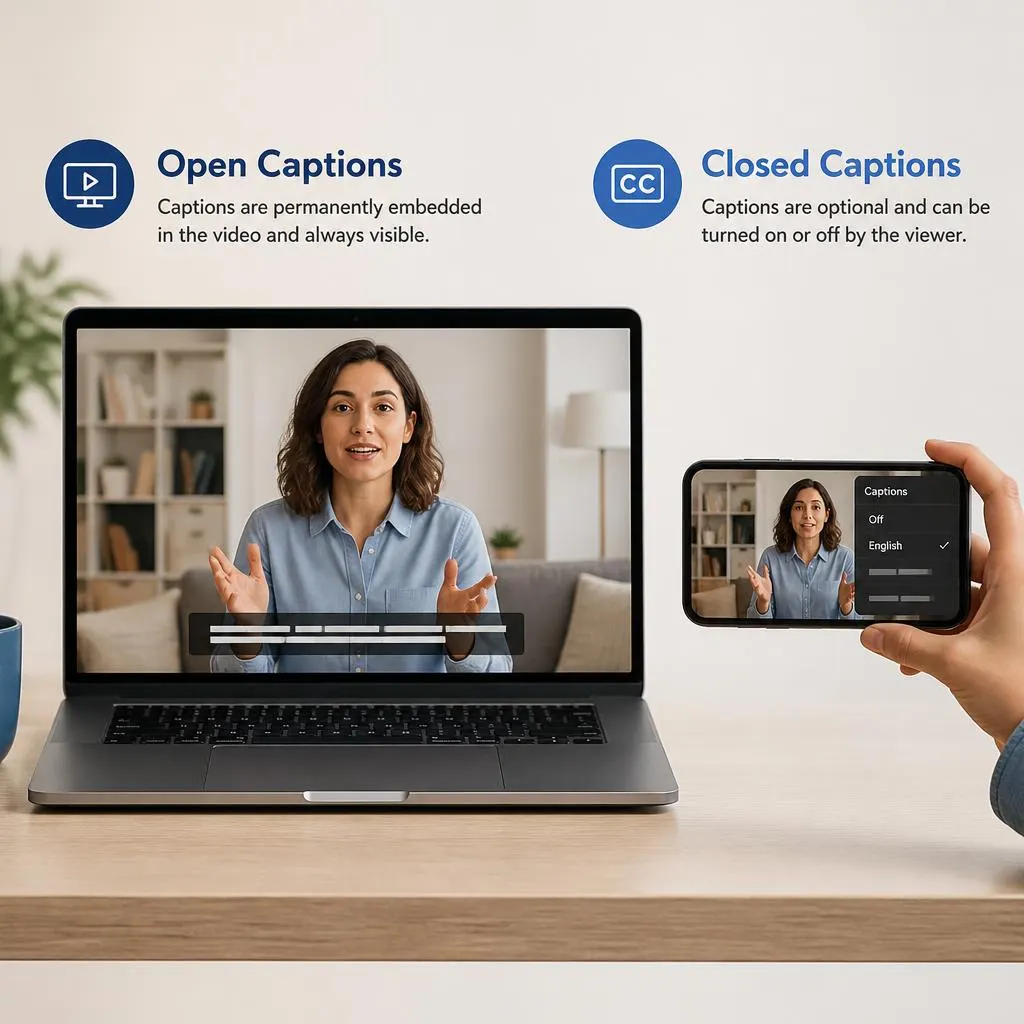
Quick Answer:
Open captions are subtitles permanently embedded in a video, making spoken dialogue and relevant audio information visible on the screen without requiring viewers to turn them on. Unlike closed captions, which viewers can usually enable or disable, open captions remain visible throughout the video wherever they appear. They help make videos more accessible for deaf and hard of hearing viewers and improve understanding when people watch without sound. Open captions are commonly used in social media videos, online tutorials, advertisements, films, and public displays.
The open caption meaning is simple: open captions are subtitles that remain visible on the video because they are permanently embedded in the picture. Viewers do not need to turn them on or change a setting to see them. They appear as part of the video itself.
You may see open captions in social media clips, online videos, films, public presentations, and other content where creators want spoken words to be visible to everyone. They can help viewers follow dialogue when the sound is off and make content more accessible to people who are deaf or hard of hearing.
However, open captions are not exactly the same as closed captions, subtitles, or automatic captions. Understanding these differences helps you choose the right captioning method for your videos, website, or viewing experience.
What Does Open Caption Mean?
Open captions are text versions of spoken dialogue and relevant audio information that are permanently displayed on a video. They are part of the video image, so viewers cannot switch them off using a normal caption setting.
For example, if a TikTok video shows a person speaking and the words appear directly on the screen throughout the clip, those words may be open captions.
Open captions can include:
- Spoken dialogue.
- Important sound descriptions, such as a door slamming or a phone ringing.
- Speaker identification when it helps viewers understand who is talking.
- Other relevant audio information that supports comprehension.
The exact content depends on the purpose of the captions. Some open captions display only dialogue, while accessibility focused captions may communicate important non speech sounds as well.
What Do Open Captions Look Like?
Open captions usually appear as readable text over the video, often near the bottom of the screen. Creators may use white text with a dark outline, a shaded background, or another high contrast style to make the words easy to read.
For example, imagine a video showing someone explaining how to bake a cake. As the person says, “Add two cups of flour,” the same words appear directly on the video. When the person explains the next step, the text changes to match the new dialogue.
Because the captions are embedded in the picture, they remain visible wherever that video is played. Their appearance may vary depending on how the creator designed and exported the video.
Open Captions vs. Closed Captions
- Open captions and closed captions both help viewers understand video content, but the main difference is whether viewers can turn them off.
Always visible
The text is embedded in the video image. Viewers generally cannot hide it through the video player’s caption controls.
Captions are provided as a separate track or supported text layer. Viewers can usually turn them on or off when the player supports the feature.
Key Differences at a Glance
| Feature | Open captions | Closed captions |
|---|---|---|
| Visible by default | Yes | Depends on player settings |
| Can viewers turn them off? | No, not through normal caption controls | Usually yes |
| Embedded in video image | Yes | Usually provided separately |
| Appearance controlled by creator | Usually | Depends on the player and format |
| Requires a caption toggle | No | Usually |
| Works across different video players | Yes, as part of the image | Requires support for the caption track |
The practical distinction is that open captions are always part of the visible picture, while closed captions offer viewers more control. Both can support accessibility when they accurately communicate the relevant audio information.
Open Captions vs. Subtitles
The terms open captions and subtitles are sometimes used interchangeably, but they can describe different things depending on the platform and context.
Captions generally communicate spoken dialogue and meaningful non speech sounds. Subtitles often focus on spoken dialogue, particularly when translating it into another language. Open and closed, on the other hand, describe whether the text is permanently visible or can be switched on and off. These are separate distinctions.
For example:
- Open captions: English dialogue permanently displayed on an English language video.
- Closed captions: English dialogue and relevant sound information available through a selectable caption track.
- Translated subtitles: Spanish text translating dialogue spoken in English.
- Burned in subtitles: Translated text permanently embedded in the video image.
A video can have open captions in the same language as its dialogue or burned in subtitles in a different language. The word open does not automatically mean the captions provide a translation.
Why Are Open Captions Used?
Open captions are useful when a creator wants text to remain visible regardless of the viewer’s settings or video player. They also help deliver important spoken information when people watch without sound.
Creators use open captions on TikTok, Instagram Reels, and other short form videos so viewers can follow dialogue while scrolling with the sound muted.
Films and public screenings
Open caption screenings display dialogue and relevant audio information directly on the cinema screen, making captions visible to the audience without individual settings.
Museums and public displays
Videos playing on digital signage or exhibition screens may use open captions because viewers might not have access to individual caption controls.
Educational content
Teachers and course creators may embed captions in a lesson when they need the same text to appear across different playback environments.
The right choice depends on the audience, viewing environment, and accessibility requirements. For public websites and learning platforms, a selectable caption track often gives viewers more control over their experience.
Benefits of Open Captions
Open captions offer several practical benefits, particularly when a video is shared across different platforms.
1. Viewers Do Not Need to Enable Them
The captions appear automatically with the video. Viewers do not have to locate a CC button or explore player settings.
2. They Help People Follow Videos Without Sound
People may watch videos in waiting rooms, public transport, offices, or other places where playing audio is inconvenient. Open captions communicate spoken information even when the sound is muted.
3. They Can Improve Accessibility
People who are deaf or hard of hearing can use captions to access dialogue and important sound information. Accurate captions should include meaningful audio details rather than only a shortened version of what the speaker says.
4. Their Appearance Stays Consistent
Creators can choose the font, color, size, and placement before exporting the video. The captions generally retain that appearance when the video is played on different devices.
5. They Work Across Many Video Platforms
Because the captions are part of the image, they do not depend on the receiving platform supporting a particular subtitle file or caption format.
Disadvantages of Open Captions
Open captions are not always the best choice. Their permanent appearance creates some limitations.
- Viewers cannot hide them: People who prefer watching without text have no normal player setting to remove embedded captions.
- Text can cover important visuals: Poor placement may obscure a person’s face, product details, or information within the scene.
- Corrections require editing the video: If an embedded caption contains a mistake, the creator usually needs to edit and export the video again.
- Customization is limited: Viewers generally cannot change the embedded text’s size, font, color, or position through their player.
- Accessibility can be incomplete: Text embedded in an image may not be available to screen readers as a caption track. A separate accessible caption track or transcript may still be necessary.
For these reasons, open captions work well for some situations, but they should not be treated as the perfect solution for every video.
How to Create Open Captions for a Video
You can create open captions using a video editing app, a desktop editor, or a captioning service. The goal is to synchronize the words with the audio and embed them into the finished video.
Follow these steps:
- Prepare your video. Record or import the clip you want to caption.
- Generate or write the captions. Use automatic transcription as a starting point or type the dialogue manually.
- Correct transcription errors. Check names, technical terms, punctuation, and meaningful sound descriptions.
- Synchronize the text. Make each caption appear when the corresponding words or sounds occur.
- Customize the appearance. Choose a readable font, appropriate size, high contrast, and a position that does not hide important visuals.
- Export the video with captions embedded. Depending on your editor, this may be called burned in captions, hardcoded subtitles, or embedded subtitles.
- Watch the exported file. Confirm that the captions remain visible, match the audio, and are readable on a phone and a larger screen.
Before publishing, check that your captions communicate the complete meaning of the audio. The W3C’s accessibility guidance recommends accurate, synchronized captions that include meaningful non speech audio information and do not obstruct relevant video content.
Open Captions Best Practices for Creators
Use these guidelines to make embedded captions easier to read and understand.
- Prioritize accuracy. Correct automatically generated captions before exporting your video.
- Use clear wording. Keep caption lines short enough to read comfortably without changing the speaker’s intended meaning.
- Choose readable colors. Ensure the text contrasts with the video background.
- Keep the timing natural. Captions should appear with the relevant dialogue and remain visible long enough to read.
- Describe meaningful sounds. Include information such as laughter, alarms, or music when it contributes to understanding the video.
- Avoid covering essential visuals. Position captions so they do not hide faces, demonstrations, or important on screen text.
- Consider your audience. Choose language and terminology your intended viewers can understand.
- Provide alternatives where appropriate. If accessibility is important, consider supplying a transcript or a separate caption track in addition to the embedded text.
These practices are more valuable than adding decorative effects that make captions harder to follow.
FAQs
1. What does open caption mean in simple words?
An open caption is text showing spoken dialogue or other relevant audio information that is permanently embedded in a video. It stays visible and cannot be turned off through ordinary caption settings.
2. What is the difference between open and closed captions?
Open captions are always visible because they form part of the video image. Closed captions are usually supplied as a separate track that viewers can turn on or off using a compatible player.
3. Are open captions the same as subtitles?
Not necessarily. Open describes captions that cannot be switched off. Subtitles often display dialogue or translate it into another language. Subtitles can also be embedded permanently in a video.
4. Can you turn off open captions?
No, not through normal video player controls. You would generally need a version of the video without the embedded text or an edited copy with the captions removed.
5. Are open captions good for accessibility?
They can improve access to spoken information for people who are deaf or hard of hearing. However, embedded text may not be adjustable or readable by screen readers. A separate caption track can offer additional accessibility benefits.
6. Why do creators use open captions on TikTok and Instagram?
Creators use them to keep spoken words visible while people scroll through videos, including when the sound is muted. They also provide consistent text styling across different devices.
7. Do open captions include sound effects?
They can. Complete accessibility focused captions may include meaningful sound effects, music cues, laughter, and speaker identification, not just spoken dialogue. The exact content depends on how the captions were created.
8. What does burned in captions mean?
Burned in captions are text permanently embedded into the video image during editing or export. The term generally describes the same basic concept as open captions.
9. Are open captions better than closed captions?
Neither option is always better. Open captions work well when text must always remain visible, such as on public displays or short social videos. Closed captions generally give viewers more control over whether captions appear and how they look.
10. Can open captions be added to an existing video?
Yes. Import the video into a compatible editor, create or generate captions, correct their timing and wording, and export a new version with the captions embedded.
Conclusion
The open caption meaning comes down to one important feature: the captions stay visible because they are permanently part of the video image. Unlike closed captions, they do not rely on viewers switching on a caption setting.
Open captions can make videos easier to follow, support accessibility, and keep text consistent across platforms. To get the best results, focus on accurate wording, readable formatting, and well timed text. If viewers need greater control over caption appearance, consider providing a separate caption track as well.